The Purpose of Hospital Malpractice Claims Benchmarking
In claims benchmarking, you compare the number of medical
malpractice claims against one hospital facility or system to the number
of claims made against comparable entities. The end result, in graphic
format, lets you see how your facility or system measures up to its
peer group in terms of claims made against it.
Five Simple Steps to Your Benchmark
Hospital Malpractice Claims Benchmarking involves five
steps. On the screen for this section, there's a tab for each of these
steps:
-
Entity’s Peer Group: Select the criteria
for the types of entities/facilities whose claims
you want to use for comparison. For example, if you're benchmarking
a hospital with 501-750 beds, you may want to compare it to other
hospitals with a similar number of beds.
- Peer Group’s Claims: Identify the
types of claims you want to include in the peer group,
based on considerations such as Claim Costs, Status, Claim Dates and
other factors.
- Entity’s Claims: Choose the claims
to benchmark for your selected entity. There are two options for this:
use claims already loaded into the Advisen database to filter your
results, or manually enter a claim count and loss amount.
- Benchmark Options: Select the types
of graphs you want to see. For example, you may want to compare
Frequency, Severity, Cost to Revenue, etc. You can also select how
many individual graphs of the analytic(s) to produce based on the
peer group.
- Show Graphs: Here you will view the graphs
comparing the claims of your selected hospital facility to those of
its peer group. Downloadable to word documents.
Moving Between Steps
Benchmarking is not a "one-way" process. You
may move freely among the different tabs to change your selections.
For example, you might choose to benchmark based on size or location
(the Entity’s Peer Group tab). Then, after seeing the
graphs for that benchmark, you might choose to return to Entity’s
Peer Group to experiment with a different configuration. As you
finish each step, click the Update Count button in the lower
right corner of the screen to ensure that your selections have been
processed.

Fig. 1, “Hospital
Malpractice Claims Benchmarking Tabs.” Clicking the tabs lets
you move back and forth between the different parts of the benchmarking
process.
|
|
Filter Selections Sidebar (Left Side of Page):
A. |
Overview –
The Filter Selections sidebar for Claims Benchmarking keeps track
of the various filter selections you have chosen. Whereas in Program
Benchmarking the sidebar only monitors selections for peer group,
in Claims Benchmarking some of the filters apply to both peer
group AND the entity/facility being benchmarked. For example,
a Claim Costs filter appears on the Peer Group’s Claims
screen AND the Entity’s Claims screen. Since you can make
different selections in the two places, it’s necessary that
selections from both be shown. |
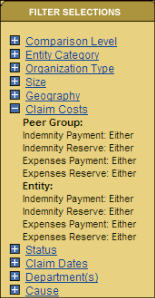
Fig. 2,
“Filter Selection Panel.” As you progress through
the steps of benchmarking, you can always look here for a reminder
of your peer group selections. |
B. |
Filtering Result Counts
– Program Benchmarking has 1 count (the peer group) on the
bottom of the sidebar. In Claims Benchmarking, there are 3 counts:
- Peer Group: The number of entities/facilities matching the
Entity Peer Group selection criteria you entered. The default
is the total number of Entities for which Advisen has claims
in its database.
- Peer Claims: The number of entities/facilities matching the
Claims Peer Group selection criteria. The default is the total
number of claims Advisen has in its database.
- Entity’s Claims: This count is derived from one of
two sources depending on your Claims Source setting on the Entity’s
Claims screen:
- If the Claims Source is Advisen database, then the number
of claims shown here should be the number of claims matching
the Entity’s Claims filters.
- If the Claims Source is Manual entry (the default), then
the number of claims shown here should be the number of
claims you have typed in the # of Claims screen.
|
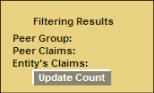
Fig.
3, “Filtering Results Menu.” Here you can
see the results of your criteria selections. Unlike Program Benchmarking,
Hospital Malpractice Claims Benchmarking divides the results into
three categories or “counts.”

Fig. 4,
“Claims Source Menu.” The results of the Entity’s
Claims count change according to your selection from this menu. |
|
